0 item(s)
View cart
You have no items in your shopping cart.
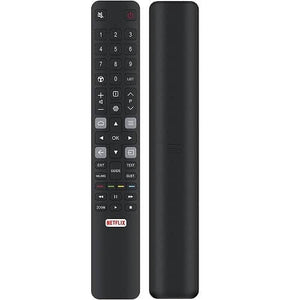
Restore convenient control of your television with this replacement infrared (IR) remote control for selected FFALCON U64 Series TVs.
Designed for FFALCON FF43U64, FF50U64, FF55U64, FF65U64 and FF75U64 televisions, this compatible replacement remote offers a practical solution when your original remote is lost, damaged or no longer working.
With no programming or pairing required, simply insert 2 new AAA batteries (not included), point the remote towards your compatible FFALCON television and start using it.
Ideal as a replacement or spare remote for everyday home entertainment.
FFALCON U64 Series Compatibility: Designed for selected FFALCON televisions, including FF43U64, FF50U64, FF55U64, FF65U64 and FF75U64.
Infrared (IR) Technology: Uses infrared signals to communicate with compatible televisions.
No Programming Required: Ready to operate supported TV functions after installing batteries.
Easy Setup: No Bluetooth pairing or complicated installation required.
Convenient TV Operation: Designed to control supported functions such as power, volume, channel selection and menu navigation.
Practical Replacement: Ideal for replacing a lost, damaged or faulty FFALCON remote control.
Lightweight and Comfortable: Suitable for regular home entertainment use.
Battery Powered: Requires 2 × AAA batteries (not included).
| Specification | Details |
|---|---|
| Product Type | Replacement TV Remote Control |
| Compatible Brand | FFALCON |
| Compatible TV Series | U64 Series |
| Connection Type | Infrared (IR) |
| Condition | Brand New |
| Programming Required | No |
| Bluetooth Pairing | Not Required |
| Voice Control | Not Supported |
| Battery Type | 2 × AAA |
| Batteries Included | No |
| Colour | As Pictured |
| Package Quantity | 1 Remote Control |
This replacement infrared remote control is listed as compatible with the following FFALCON televisions:
FFALCON FF43U64 – 43-inch TV
FFALCON FF50U64 – 50-inch TV
FFALCON FF55U64 – 55-inch TV
FFALCON FF65U64 – 65-inch TV
FFALCON FF75U64 – 75-inch TV
FF43U64, FF50U64, FF55U64, FF65U64, FF75U64.
Important: Please check your television's exact model number before ordering. Compatibility with other FFALCON TV models is not guaranteed.
Open the battery compartment on the back of the remote.
Insert 2 new AAA batteries, following the correct polarity markings.
Close the battery compartment securely.
Point the remote towards your FFALCON television's infrared receiver.
Use the remote to operate supported TV functions.
No programming, syncing or Bluetooth pairing is required for compatible infrared operation.
1 × Replacement IR Remote Control for FFALCON TV
Please note: Batteries are not included.
This is an infrared replacement remote control, not a Bluetooth voice remote.
Voice commands and Bluetooth functionality are not supported.
The remote must be pointed towards the television's infrared receiver during operation.
Some advanced functions available on the original remote may not be supported.
This is a compatible replacement remote, not advertised as a genuine FFALCON-manufactured product.
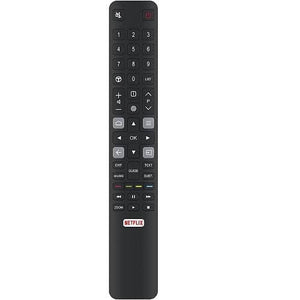
Please compare your original remote's button layout and confirm your TV model before purchasing.
If your television model is not listed or you are unsure whether this remote will work, please contact us with your FFALCON TV model number or a clear photo of your original remote.
Our team will be happy to assist you in finding a suitable replacement.
Frequently Asked Questions (FAQs)
Yes. The FF43U64 is included in the supplied compatibility list. This replacement infrared remote is designed for compatible FFALCON U64 Series televisions.
Yes. Both FF50U64 and FF55U64 are listed as compatible models. Please confirm the model number on your television before ordering.
The FF65U64 and FF75U64 are included in the advertised compatibility list. Please compare your original remote's button layout to confirm suitability.
No. This infrared remote is designed to work with compatible televisions without programming. Simply insert 2 AAA batteries and point it towards your TV.
No. This is an infrared-only remote control. Voice commands, Bluetooth voice search and Google Assistant voice functions are not supported.
The remote requires 2 × AAA batteries, which are not included in the package.
This product is advertised as a compatible replacement remote control, not an original FFALCON-manufactured remote.
You can navigate supported Smart TV menus and streaming applications using the compatible navigation buttons. Dedicated app shortcuts depend on the remote's button layout and the TV's supported functions.
Please check that the AAA batteries are new and correctly installed, the remote is pointed towards the TV's infrared receiver and there are no objects blocking the signal. Also, confirm your TV model is listed as compatible.
No. This remote uses infrared technology and does not require Bluetooth pairing.
No. It is intended for the listed FFALCON U64 Series models. Compatibility with other FFALCON televisions has not been confirmed.
Please contact us with your complete television model number or a photo of your original remote. We can help you check whether this replacement is suitable.